We’ve just released TQI Tasks, a new feature that lets you measure translation quality across your content using objective scoring.
TQI Tasks calculate quality scores for translations (both human and machine) using the Translation Quality Index, which is based on the MQM framework. The scoring considers your project’s glossary, style guides, and other context to give you consistent quality measurement.
How to use it:
-
Go to the Editor and select the strings you want to evaluate
-
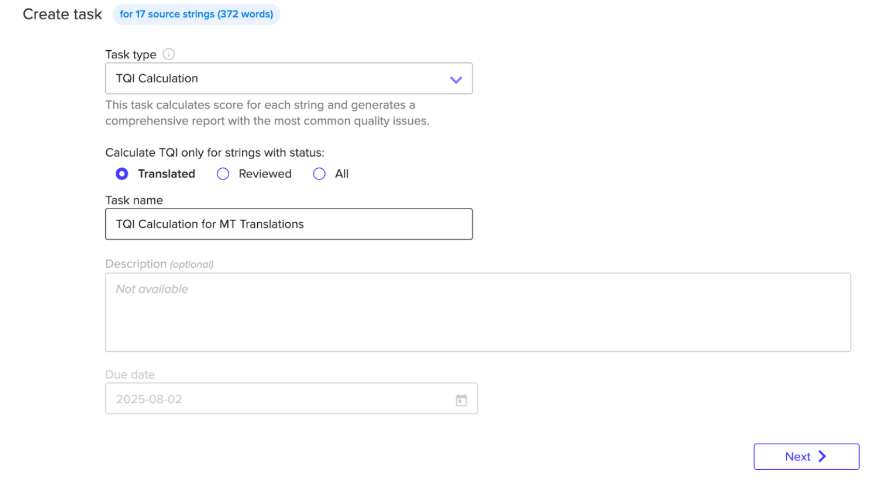
Click ‘Create Task’ under Bulk Actions
-
Choose ‘TQI Calculation’ as your task type
-
Select your target languages and run the task
-
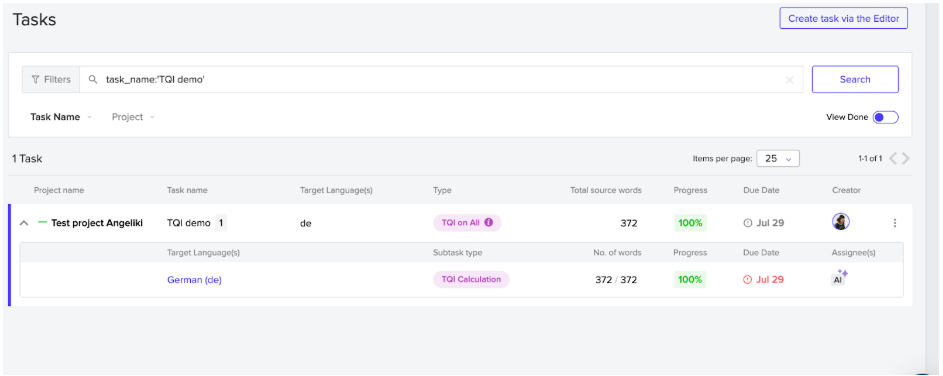
You’ll then be able to monitor the progress of the task. The exact amount of time this will take will vary on factors such as how much content you have included in your task
-
View results directly in the Editor with quality scores and analysis
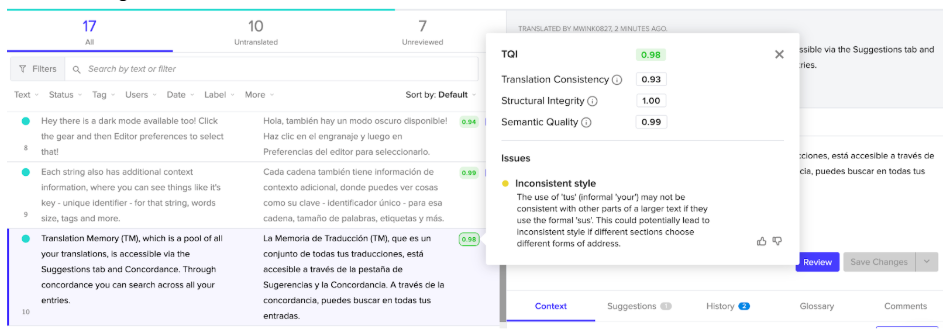
Instead of guessing at translation quality, you get data to help decide when machine translation is sufficient and when human review is needed. You can also compare performance across different translation providers and engines.
The feature is now live so feel free to try it and share your feedback with us. You can find out more details in our Help Center.